
A CDP unifies cross-channel customer data for marketing activation; a CRM manages direct contact records, deal pipelines, and service workflows for sales and support teams. They are complementary systems, not substitutes, and the most effective stacks run both in bidirectional sync. Before you evaluate vendors, audit your data scope first: if you are collecting behavioral events across more than two channels and need to activate segments in real time, a CDP belongs in your stack alongside your CRM, not instead of it.
According to Cdp, a CRM manages structured relationship workflows entered by teams, while a CDP ingests behavioral, transactional, and anonymous events in real time to build unified customer profiles. That architectural difference is the whole decision. Get it wrong and you end up forcing high-velocity event data into a CRM, which creates performance bloat and latency, or you buy a CDP without the governance to make it work.
Key Takeaways
A CDP and a CRM solve different problems, and the most effective growth stacks run both in bidirectional sync with the CDP as the identity hub and the CRM as the relationship record system.
| Point | Details |
|---|---|
| CDPs and CRMs are complementary | A CDP handles behavioral data and identity resolution; a CRM manages deals, contacts, and service workflows. |
| Identity resolution drives CDP value | Define matching keys and confidence thresholds before any data flows to avoid costly rework. |
| Start narrow, instrument everything | Pick one use case with a measurable revenue or retention metric before expanding the integration. |
| Privacy compliance requires upfront design | Deploy a consent layer before CDP go-live and map PII across both systems to meet CCPA requirements. |
| Ashafrazier builds integrated stacks | Engagements run from data audit through pilot to scale, tied to specific CAC and retention outcomes. |
Table of Contents
- What a customer data platform actually does
- How a CRM works and where it stays essential
- CDP vs CRM: the dimensions that matter to marketing leaders
- When to choose a CDP, when a CRM is enough, and when you need both
- How to integrate a CDP and CRM without breaking both
- What CDPs and CRMs actually cost
- Vendor examples and which organizations they suit
- Privacy, consent, and U.S. compliance considerations
- Practical evaluation checklist and vendor questions to ask
- The mistake most teams make when buying these systems
- How Ashafrazier helps organizations build integrated CDP and CRM strategies
- Sources
What a customer data platform actually does
The CDP Institute defines a CDP as software that creates and maintains a persistent, unified customer record and assumes responsibility for identity, governance, and making profiles available to other systems. That definition carries real weight. "Persistent" means the profile survives across sessions, devices, and channels. "Unified" means the CDP stitches together anonymous and known data into a single record. "Available to other systems" means the CDP is not a destination; it is a hub that feeds your email platform, your ad channels, your personalization engine, and yes, your CRM.
A CDP ingests data from a wide range of sources simultaneously:
- Web and mobile behavioral events (page views, clicks, app sessions)
- Point-of-sale and e-commerce transaction data
- Email engagement signals (opens, clicks, unsubscribes)
- CRM contact and deal records
- Offline data (loyalty program IDs, in-store interactions)
- Third-party enrichment feeds
The core capabilities that separate a CDP from a data warehouse or a DMP are ingestion at event-level granularity, identity resolution across devices and channels, persistent profile storage with no forced expiration, audience segmentation and activation, and consent and governance controls. TechTarget notes that CDPs were built specifically to reduce reliance on IT-led warehouse projects, giving marketing teams the autonomy to govern their own customer data without waiting on engineering sprints.
A concrete example: a visitor browses your pricing page three times in five days without converting. Your CDP captures each session as a behavioral event, links all three to the same anonymous profile via device fingerprint, then resolves that profile to a known email address when the visitor opens a nurture email. That enriched segment, "high-intent pricing page visitors," gets pushed to your email platform for a targeted sequence within minutes of the third visit.

How a CRM works and where it stays essential
A Customer Relationship Management system is built around structured records: contacts, accounts, deal stages, support tickets, and the activity logs that sales and service teams create manually or through logged interactions. The CRM's job is to manage the relationship lifecycle from first contact through closed deal and ongoing support, with workflows, reminders, and forecasting built on top of that structured data.
Two workflows illustrate where CRMs remain irreplaceable. In a sales pipeline, a rep logs a discovery call, moves a deal from "qualified" to "proposal sent," sets a follow-up task, and the CRM surfaces that deal in the manager's forecast. None of that requires behavioral event data. In a support ticket lifecycle, a customer submits a complaint, the ticket routes to the right agent, the agent logs resolution notes, and the CRM tracks time-to-close for SLA reporting. Again, structured, human-entered data driving a defined workflow.
CRMs typically receive their data through manual entry by reps, form submissions, email integrations, and calendar syncs. Some CRMs pull in basic web activity through their own tracking scripts, but that is shallow compared to what a CDP captures. The CRM's data model is optimized for relational, structured records, which is exactly why forcing high-velocity behavioral events into it creates the performance and usability problems practitioners warn about.
CDP vs CRM: the dimensions that matter to marketing leaders
Salesforce frames CDPs and CRMs as complementary: CDPs power marketing personalization and analytics while CRMs handle sales and service workflows, and integrated use unlocks greater value. That framing is correct, and the table below maps the specific dimensions where the two systems diverge.
| Dimension | CDP | CRM |
|---|---|---|
| Primary purpose | Build unified customer profiles for marketing activation | Manage contact records, deals, and service workflows |
| Primary users | Marketing, data, and analytics teams | Sales, service, and customer success teams |
| Data types | Behavioral events, transactions, anonymous signals, first-party enrichment | Structured contacts, accounts, deal stages, support tickets |
| Identity resolution | Cross-device, cross-channel stitching of anonymous and known data | Contact deduplication within known records only |
| Activation channels | Email, paid ads, personalization engines, push, SMS, CDP-to-CRM sync | Email sequences, call tasks, pipeline workflows, support routing |
| Real-time capability | Near real-time event ingestion and segment updates | Updates on manual entry or scheduled sync |
| Integrations/ownership | Marketing and data teams own connectors and governance | Sales ops and IT typically own integrations |
| Data retention and privacy | Long-term retention with consent management and CCPA/GDPR controls | Contact-level consent flags; retention varies by vendor |
| Cost drivers | Data volume, monthly active profiles, event throughput, activation connectors | Per-seat licensing, contact tier limits, add-on modules |
| Replaces the other? | No: lacks deal management, forecasting, and service workflows | No: lacks behavioral ingestion, identity resolution, and real-time activation |
Can a CDP replace a CRM? No. A CDP has no native deal pipeline, no sales forecasting, no support ticket routing, and no rep-facing workflow layer. Buying a CDP and canceling your CRM leaves your sales and service teams without the structured workflow tools they depend on. The reverse is equally true: a CRM cannot replace a CDP because it lacks the event-based architecture needed to ingest high-velocity behavioral data, resolve identity across anonymous and known states, and activate segments in real time.
Pro Tip: The most common integration mistake is treating identity resolution as a configuration checkbox rather than a strategic decision. Before you connect your CDP and CRM, define your matching keys (email, phone, loyalty ID), set confidence thresholds for probabilistic matches, and document suppression rules. Teams that skip this step spend months untangling duplicate profiles and misfired campaigns.
When to choose a CDP, when a CRM is enough, and when you need both
The right answer depends on your data complexity, your team structure, and the activation outcomes you are trying to drive. Four scenarios cover most of the decision space:
Small sales-led businesses (under 50 employees, primarily outbound or referral-driven): A CRM is your primary system. You have limited behavioral data worth unifying, your sales team needs pipeline visibility, and the engineering overhead of a CDP exceeds the value at this stage. A well-configured HubSpot or Salesforce CRM handles contact management, email sequences, and basic reporting without a CDP layer.
Midmarket companies with rising personalization needs (e-commerce, SaaS, or media with 50,000+ monthly active users): This is the inflection point. You are collecting web, app, and email behavioral data across multiple channels, and your CRM cannot stitch those signals into a coherent customer view. A CDP like Twilio Segment or Tealium becomes the identity hub that feeds enriched segments back to your CRM and your ad platforms. The CRM stays as the sales and service record system.
Enterprise omnichannel retailers: Both systems are non-negotiable. Shopify's analysis confirms that CDPs capture broader behavioral and cross-channel data automatically and can pull CRM contact records into a unified profile. For a retailer with physical stores, an e-commerce site, a loyalty program, and a mobile app, the CDP resolves identity across all four channels and activates segments in real time. The CRM manages B2B wholesale accounts, franchise relationships, and customer service escalations.
Subscription businesses focused on churn reduction: The CDP is the early-warning system. It captures the behavioral signals that precede churn, such as declining login frequency, feature abandonment, and support ticket spikes, and surfaces them as segments for lifecycle marketing. The CRM holds the account health records and drives the customer success team's outreach workflows. Neither system alone closes the loop; the bidirectional sync between them is what makes retention programs work.
For B2B SaaS specifically, a practical quick-win is to use the CDP to enrich CRM records with recent behavioral context for sales outreach. That scope limits initial engineering work while proving value to the sales team immediately, which builds the internal momentum needed for a full integration.
How to integrate a CDP and CRM without breaking both
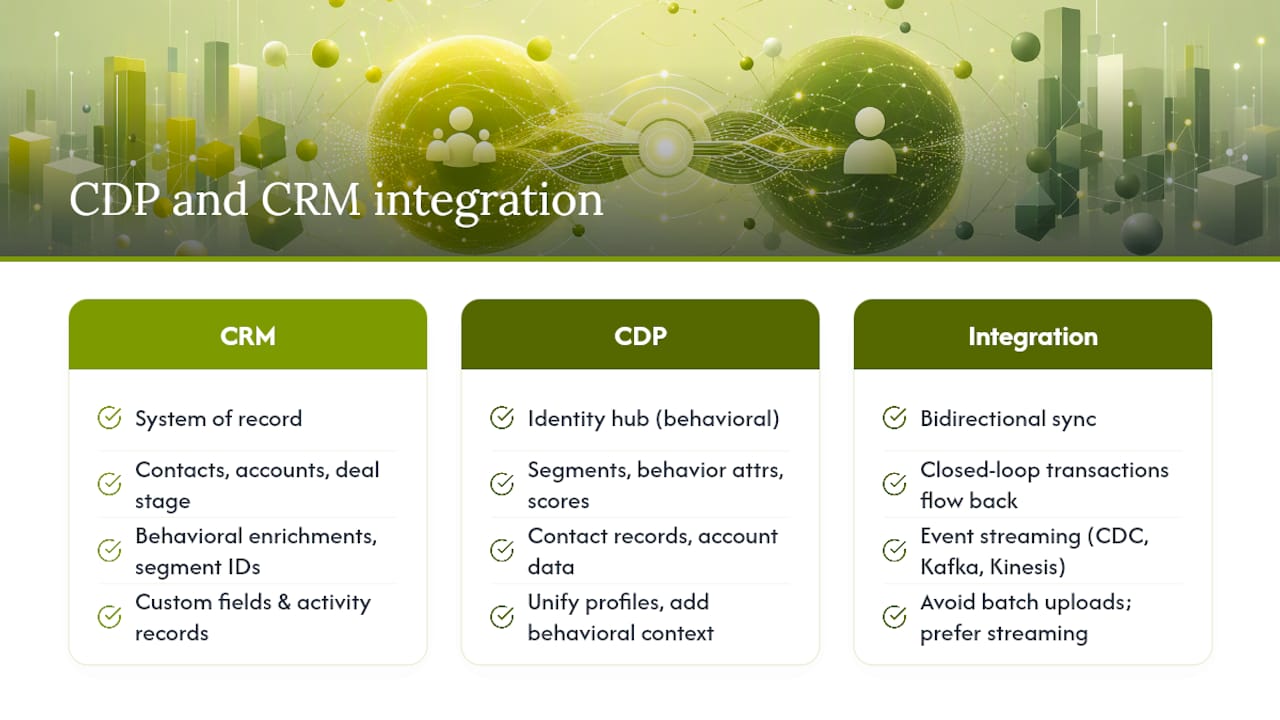
The preferred integration pattern is bidirectional sync with the CDP as the identity hub for behavioral context. The CRM remains the system of record for relationship data. Neither system should try to own what the other does better.
CRM to CDP flow: Contact records, account data, and deal stage information flow from the CRM into the CDP so the CDP can incorporate relationship context into its unified profiles. A contact's deal stage, for example, should suppress them from top-of-funnel acquisition campaigns.
CDP to CRM flow: Enriched behavioral attributes, segment memberships, and propensity scores flow from the CDP back into the CRM as custom fields or activity records. A sales rep seeing "visited pricing page 4 times in the last 10 days" in their CRM contact record has context that changes how they approach the next call.
Event streaming: For high-velocity behavioral data, prefer CDC (change data capture) or event-streaming tools like Apache Kafka or Amazon Kinesis over periodic bulk uploads. Batch uploads introduce lag that undermines real-time activation and can create stale segment membership in your ad platforms.
Closed-loop transaction data: Purchase events and subscription renewals should flow back from your commerce systems through the CDP and then into the CRM, so both systems reflect the customer's current revenue status.
Implementation checklist:
Audit every data source before you touch a vendor. Map which systems produce which events, which fields carry PII, and which identifiers (email, phone, loyalty ID, device ID) exist across sources. This audit takes longer than expected and is the most important step.
Define identity rules explicitly. Decide whether you are using deterministic matching (exact email match), probabilistic matching (device fingerprint plus behavioral similarity), or both. Document the confidence thresholds and suppression rules before any data flows.
Deduplicate before you ingest. Sending duplicate records into a CDP compounds into duplicate profiles that are expensive to clean up downstream.
Run a 30–90 day pilot on one high-value use case before expanding. Instrument end-to-end measurement from the start so you can prove business impact, not just technical connectivity.
Define SLAs and observability requirements. Know your acceptable latency for segment updates, set up pipeline monitoring, and establish who owns incident response when a sync breaks.
Pro Tip: Start with one use case that has a clear revenue or retention metric attached to it. "Enrich CRM records with behavioral context for sales outreach" is a better first project than "build a 360-degree customer view," because it has a measurable outcome and a defined owner.
What CDPs and CRMs actually cost
Pricing models differ structurally, and the sticker price rarely reflects total cost of ownership.
CDP pricing drivers:
- Monthly active profiles (the most common model; costs scale with your addressable audience size)
- Event or pageview volume (relevant for high-traffic sites where event throughput drives costs)
- Data connectors and destinations (each activation channel, such as Google Ads, Salesforce, or Braze, may carry a per-connector fee)
- Professional services for implementation and identity configuration
CRM pricing drivers:
- Per-seat licensing (the dominant model; costs scale with your sales and service headcount)
- Contact tier limits (some CRMs charge more as your contact database grows)
- Add-on modules for marketing automation, analytics, or AI features
Hidden costs to budget for:
- Integration engineering time, which practitioners consistently underestimate
- Identity resolution tuning, especially when offline and online identifiers need reconciliation
- Data governance and compliance tooling (consent management platforms, data subject request workflows)
- Storage and retention costs for long-term behavioral data
- Activation add-ons when your CDP charges per destination
Pro Tip: Structure your internal ROI conversation around a specific retention or acquisition metric, not a technology capability. "This CDP integration will reduce churn by improving our early-warning segmentation" is a fundable business case. "We need a unified customer view" is not. Tie the investment to LTV:CAC ratio improvements and the conversation changes.
Vendor examples and which organizations they suit
The line between CDP and CRM vendors is blurring. Salesforce now offers both a CRM and a CDP product, and Adobe's Experience Platform spans data unification, analytics, and activation. That convergence makes vendor selection more complex, not simpler. Evaluate integration readiness and organizational fit, not just feature lists.
A note on CRM options for specialized verticals: sector-specific CRMs exist for contractors, field service, and other industries where generic platforms leave workflow gaps. When evaluating any vendor, ask specifically about their identity resolution logic, data retention defaults, connector latency, and backward compatibility guarantees. A product that works in a demo environment with clean sample data often behaves differently at production scale with messy, multi-source records.
Privacy, consent, and U.S. compliance considerations
CDPs and CRMs handle personally identifiable information differently, and that difference carries legal weight under the California Consumer Privacy Act (CCPA) and its amendment, the CPRA. A CDP ingests behavioral data at scale, including data from anonymous users, which means consent capture and data subject rights workflows must be built into the CDP architecture from day one. A CRM typically holds known contact records with explicit consent captured at the point of relationship initiation, which is a narrower but still regulated scope.
Key compliance action items:
- Consent capture: Deploy a consent management platform (CMP) upstream of your CDP. Anonymous behavioral data collected before consent is granted creates CCPA exposure. Your CDP should respect consent signals and suppress non-consented profiles from activation.
- Data subject access requests (DSARs): Both your CDP and CRM must support the ability to locate, export, and delete a specific individual's data on request. Verify that your vendor's DSAR workflow covers all data stores, including backup snapshots.
- Opt-out handling: CCPA requires honoring "do not sell or share" requests. Map how opt-out signals propagate from your consent layer through your CDP and into every downstream activation destination.
- Data retention policies: CDPs retain data longer than DMPs by design, per the Wikipedia summary of CDP architecture. Set explicit retention windows for behavioral data and automate deletion of records that exceed them.
- PII mapping and logging: Maintain a data map that identifies every field containing PII across both systems. Log access and processing activities to support audit requirements.
Quick governance steps to reduce legal risk: implement a consent layer before you go live with any CDP, complete a PII field audit across all data sources, and establish a documented DSAR response process with defined SLAs.
Practical evaluation checklist and vendor questions to ask
Define your business objective and a measurable success metric before you open a single vendor demo. "Improve our customer data" is not.
Audit your data sources. List every system that produces customer data: your CRM, your e-commerce platform, your mobile app, your email platform, your ad platforms, your support system. Identify which identifiers each system uses and where those identifiers overlap or conflict.
Map your identity keys. Determine which identifiers will serve as primary keys (typically email or a hashed customer ID), which will serve as secondary keys (phone, loyalty ID, device ID), and how you will handle identifier changes over time (email address updates, phone number recycling).
Pick a starting use case with a defined owner. The use case should have a revenue or retention metric, a team that will act on the output, and a measurement plan. Without an owner, CDP outputs sit unused in a dashboard.
Run a 30–90 day pilot. Instrument the full data flow from source to activation to outcome measurement before committing to a full rollout. Pilots surface identity resolution gaps and connector latency issues that vendor demos never show.
Define SLA and observability requirements. Know your acceptable lag for segment updates (minutes vs. hours), set up pipeline health monitoring, and document who owns incident response.
Vendor questions to include in your RFP:
- What is your default data retention period, and how is deletion automated?
- What is the latency from event ingestion to segment availability for activation?
- How does your identity resolution handle probabilistic matching, and what confidence thresholds are configurable?
- Which connectors are native vs. partner-maintained, and what are the SLAs for each?
- How do you handle backward compatibility when your data model changes?
- What does your support SLA look like for production incidents, and is there a dedicated implementation team?
The mistake most teams make when buying these systems
Most teams buy a CDP to solve a data problem when the real problem is a strategy problem. They invest in the technology before they have defined what a "unified customer profile" is supposed to do for the business. The result is a well-integrated system that nobody acts on, because the activation logic was never designed.
The teams that get the most out of a CDP and CRM combination start narrow and instrument everything. They pick one use case, such as enriching CRM records with behavioral context for sales outreach, run it end-to-end, and measure the outcome against a specific metric, like lowering CAC or improving pipeline conversion rate. That proof point builds the internal credibility to expand the integration.
The other mistake is treating identity resolution as a technical detail rather than a strategic one. Failing to reconcile offline and online identifiers, such as loyalty IDs, phone numbers, and email changes, is the most common cause of poor segmentation and misfired personalization. The CDP Institute's guidance on this is direct: teams that make identity rules explicit upfront avoid costly rework later. That is not a configuration task. It is a cross-functional decision that requires alignment between marketing, data engineering, and legal.
Buy the technology second. Build the strategy first.
How Ashafrazier helps organizations build integrated CDP and CRM strategies
Most organizations evaluating a CDP and CRM stack have the budget and the vendor shortlist. What they lack is a clear architecture decision, a governance model, and a pilot that proves value before the full rollout. Ashafrazier works with growth-stage and enterprise teams to move from audit to pilot to scale, with a specific focus on connecting the data infrastructure to measurable revenue outcomes.
The engagement typically starts with a data and attribution audit, mapping existing sources, identity keys, and activation gaps. From there, the work moves to designing the integration architecture, selecting the right vendor for the organization's data volume and team structure, and running a 90-day pilot instrumented against a specific CAC or retention metric. If you want to validate your ROI assumptions before committing to a vendor, the Growth Score Calculator is a practical starting point. For organizations that need ongoing strategic leadership through the implementation, the fractional CMO engagement model provides the operational depth to see it through.
Sources
The sources below provide the deepest technical definitions and standards for CDP and CRM architecture. Use vendor documentation to validate integration-specific details, since connector behavior and data model specifications change with product releases.
- Cdp
- What is a CDP? | CDP Institute
- What is customer data platform (CDP)? | TechTarget
- CRM vs. CDP: What’s the Difference? | Salesforce
- CDP vs. CRM: Differences Between Customer Data Platforms | Shopify
Recommended
- Lowering CAC in a B2B Marketplace: From $150 to $11 Per Brand — Asha Frazier
- Things I've Learned — Asha Frazier
- Marketplace Growth: When to Push Supply vs. Demand (And What Actually Compounds) — Asha Frazier
- The Essential Growth Marketing KPIs: Building a Dashboard That Drives Decisions — Asha Frazier